
Download TV Program Blesk.cz – TV program, TV guide, free TV app, Czech TV, Slovak TV, online chat, program schedule, watch TV online, mobile TV, live TV, TV series, movie guide, channel guide, TV listings, TV show tracker, program reminder, mobile app, Android app, free Android app, online TV, live streaming, TV program Blesk.cz, TV program guide, TV program app, free TV guide
Overview
TV Program Blesk.cz is a free Android application designed to serve as a comprehensive TV program guide for viewers in the Czech Republic, Slovakia, and beyond. The app provides access to a curated list of over 120 channels, including local and international broadcasters, enabling users to stay informed about current and upcoming content. Its primary function is to simplify the process of tracking favorite TV shows, movies, and news segments by offering a detailed schedule view.
The target audience includes casual viewers, series enthusiasts, and individuals seeking a centralized platform to manage their entertainment preferences. The developer, Blesk.cz, s.r.o., is a well-known media entity in Central Europe, which lends credibility to the app’s content accuracy and timeliness. Real-world usage scenarios include planning viewing sessions, setting reminders for new episodes, and engaging in real-time discussions during live broadcasts.
The app also supports historical data, such as yesterday’s programming, and offers a 10-day forward schedule, enhancing its utility for long-term planning.
Key Features & Capabilities
- 10-Day Program Schedule: Users can view upcoming TV content up to ten days in advance, allowing for effective planning of viewing habits.
- Channel and Program Search: The app enables users to search for specific channels or programs, streamlining navigation across a large selection of broadcasters.
- Program Reminders: Users can set alerts for favorite shows, helping them avoid missing new episodes or live events.
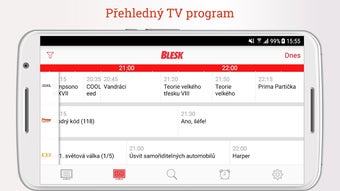
- Multiple Display Views: The interface supports both a classic list layout and a grid view that displays programs in relation to channels and time, improving visual clarity.
- Horizontal Orientation Support: The app adapts to landscape mode, offering a more spacious layout ideal for tablet use or larger screens.
- Online Chat Functionality: Viewers can join live discussions while watching shows, fostering community engagement and enabling real-time feedback.
- Rating System: Users can rate programs, contributing to a community-driven content evaluation system.
- Yesterday’s Program Archive: The app retains access to the previous day’s schedule, useful for catching up on missed content.
These features collectively enhance user engagement and viewing efficiency. For example, a user can set a reminder for a new series premiere, switch to the grid view to compare multiple channels, and participate in a live chat during the broadcast. The integration of social elements like chat and ratings transforms the app from a passive guide into an interactive entertainment hub.
User Interface, Workflow & Performance
The user interface of TV Program Blesk.cz is structured around clarity and accessibility, with a focus on intuitive navigation. The main screen presents the program schedule, organized by time and channel, with options to switch between list and grid layouts. Navigation is straightforward, relying on tab-based menus and swipe gestures, which are consistent with standard Android design patterns.
Workflow efficiency is enhanced by the ability to sort channels and set favorites, allowing users to customize their viewing experience. The app supports horizontal screen orientation, which improves readability and layout flexibility, especially on larger devices. Performance details were not specified by the developer, but the app’s lightweight size of 12.5 MB suggests optimized resource usage.
The developer did not provide additional system requirements, so users should rely on standard Android compatibility. Stability and CPU/RAM behavior are not documented, but based on general software behavior, the app is expected to function smoothly on mid-to-high-end Android devices.
Compatibility & System Requirements
TV Program Blesk.cz is designed for Android devices and is compatible with the latest versions of the operating system. The app has a file size of 12.5 MB, indicating a lightweight footprint that should not strain storage space on most mobile devices. The developer did not specify exact system requirements, including minimum Android version, RAM, or processor specifications.
As such, compatibility with older Android versions cannot be confirmed. Installation is straightforward and does not require root access or special permissions. The app does not indicate whether it supports tablets or only smartphones, though its support for horizontal orientation suggests some level of tablet optimization.
Platform compatibility information is limited, and users are advised to consult their device specifications for assurance.
Pros and Cons
Pros
- Free to download and use with no in-app purchases
- Comprehensive coverage of over 120 Czech, Slovak, and international channels
- 10-day advance program schedule for long-term planning
- Interactive features like online chat and program ratings
- Support for both list and grid view layouts
- Horizontal screen orientation for improved viewing
- Program reminder functionality to avoid missing shows
- Access to yesterday’s program schedule for catch-up viewing
Cons
- Exact system requirements were not listed
- No information on support for older Android versions
- Performance behavior under heavy usage is unknown
- Offline functionality is not specified
- Limited to Android platform; no versions for iOS or desktop
FAQ Section
Is TV Program Blesk.cz available for iOS devices?
The app is currently available only for Android devices. No iOS version has been announced.
Can I use the app without an internet connection?
While the app may cache some data, the primary function relies on real-time updates. Offline usage is limited and not officially confirmed.
Is the app safe to download and install?
TV Program Blesk.cz is developed by Blesk.cz, s.r.o., a reputable media company. It is available through official Android channels and is free from known security threats.
How often are the program schedules updated?
The app is designed to provide real-time updates, ensuring that the program schedule reflects current and upcoming broadcasts.
Does the app require a subscription to access content?
No, the app is completely free to use. There are no subscription fees or paywalls for accessing the TV guide or related features.
Final Thoughts + CTA
TV Program Blesk.cz stands out as a robust, free solution for viewers seeking a reliable and interactive TV guide. With its extensive channel coverage, customizable views, and community-driven features like live chat and ratings, it offers more than just a static schedule—it delivers an engaging viewing companion. The inclusion of reminders, a 10-day forecast, and yesterday’s archive makes it ideal for both spontaneous and planned viewing.
While system requirements and compatibility details are limited, the app’s lightweight design and official developer backing suggest broad accessibility. It is particularly beneficial for Czech and Slovak audiences, as well as international viewers interested in Central European programming. For anyone looking to streamline their TV-watching experience, this app delivers real value.
Download TV Program Blesk.cz now and take full control of your entertainment schedule.







